English: About TimeKeeper & Google Calendar ↓

iOS 베타 · App Store 출시 예정

고르기만 하면
한 주가 다시 짜여요

TimeKeeper는 일정과 실행 기록을 보고 AI가 한 주의 계획을 다시 짜 주는 일정 설계 앱입니다. 정답을 강요하지 않고, 2~4개 선택지 중 하나를 고르게 합니다.

Download on theApp Store출시 예정 웹 LifeForge 열기 ↗

앱은 아직 App Store에 없습니다. 웹 서비스 LifeForge는 지금 쓸 수 있습니다.

한 주의 고리

계획하고, 해 보고, 돌아보고, 다시 짜요

하루와 한 주를 한 바퀴로 이어, 지난주의 기록이 다음 주 계획을 고칩니다.
  1. 시간표
  2. 이번 주 계획
  3. 시간 칸 배치
  4. 실행 기록
  5. 하루·주말 돌아보기
  6. 다음 주 계획 수정
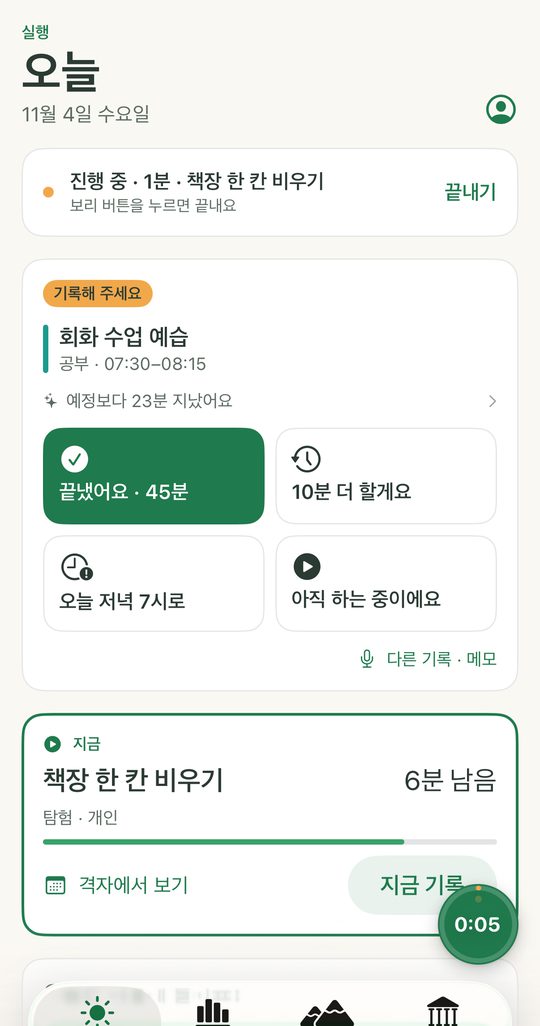
TimeKeeper 오늘 화면. 진행 중인 일과 기록할 일, 네 가지 선택 버튼이 보인다
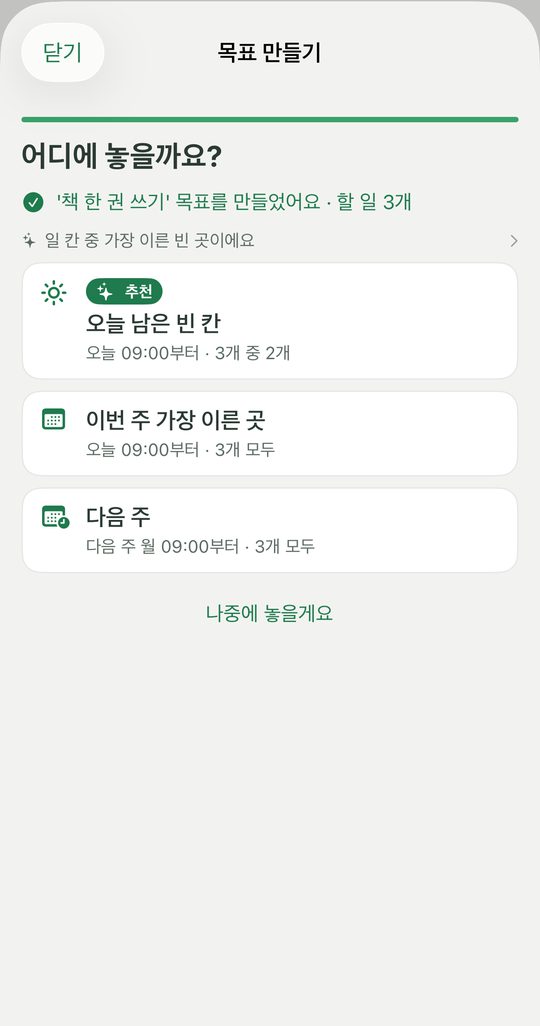
목표를 어디에 놓을지 세 가지 선택지를 보여 주는 화면
무엇을 하나요

적게 입력하고, 오래 이어 가요

기록알림에서 한 번에

알림에서 4지선다로 바로 남깁니다. 한 단계는 세 번 이내의 터치로 끝나고, 모든 입력 칸에서 말로 입력할 수 있습니다.

계획AI가 고칠 곳을 제안

지난 기록을 보고 이번 주를 다시 짜는 선택지를 내밉니다. 고르는 것은 언제나 사용자입니다.

이해나를 아는 짧은 문서

습관·선호·제약을 AI가 짧게 정리해 두어, 같은 질문을 반복하지 않습니다.

기기워치·위젯·잠금 화면

Apple Watch 기록, 위젯, 잠금 화면 실시간 현황, 단축어와 함께 씁니다.

화면은 개발 중인 베타 빌드입니다. 출시 때 달라질 수 있습니다.

웹 서비스

LifeForge — 습관 계획을 나누는 광장

다른 사람이 만든 습관 계획(레시피)을 찾아 내 계획으로 가져오고, 긴 기간의 기록을 분석실에서 살펴봅니다. 지금 공개판으로 운영하고 있습니다.

LifeForge 열기 ↗
iOS 앱
베타 빌드 완성 · App Store 출시 예정
웹 LifeForge
공개판 운영 중
요금
기본 기능 무료로 시작할 계획입니다. 유료 기능은 정해지면 알립니다.
지원·처리방침
지원 · 개인정보 처리방침 · Privacy Policy (English)
English

TimeKeeper — plan your week in time slots, then record what you did

TimeKeeper is a planning and activity-record app for iPhone (coming to the App Store), with a companion website called LifeForge. You set up your time slots, TimeKeeper's rule engine places your tasks into free slots, and you record what actually happened with a tap. Your records are then used to suggest changes to next week's plan — you always choose which suggestion to apply.

AppWhat TimeKeeper does

  • Plan: set up the time slots of your week; the rule engine places your goals and tasks into free slots.
  • Record: from a notification, record each slot with one of four choices (done, a bit more time, another day, or a fourth choice such as still in progress).
  • Review: at the end of the day and week, TimeKeeper suggests changes to the plan. Nothing changes until you choose to apply it.
  • LifeForge website: browse and import habit plans other people share, and look back over long-term records.
  • Sign in with Apple or Google. Only you can read your synced content.

OptionalGoogle Calendar connection

  • You choose to connect it on the LifeForge website (Settings > Google Calendar), and you can disconnect at any time.
  • Reads busy times only: TimeKeeper reads only the busy time ranges (start and end times) of the calendars you show in Google Calendar, so it does not place tasks on top of your existing events. It does not read event titles, attendees, locations, or descriptions.
  • Writes to one calendar only: TimeKeeper creates one calendar named "TimeKeeper" in your Google account and writes only the tasks it placed (task name and time) there. It never changes any other calendar.
  • Disconnecting: we revoke access at Google and delete our stored records, and you choose whether to keep or delete the "TimeKeeper" calendar. Deleting your account also deletes the "TimeKeeper" calendar and revokes access.
  • Your Google data: busy times are used only to calculate where your tasks go and to show overlaps. Google Calendar data is never sent to server AI. It is not used for advertising or to train AI models, and is not read by humans.

TimeKeeper's use and transfer to any other app of information received from Google APIs will adhere to the Google API Services User Data Policy, including the Limited Use requirements.

Operator
glonest (Business Registration No. 389-01-03800)
Privacy Policy
English · Korean
Support
glonest.kr/support
Status
iOS app in beta, coming to the App Store · LifeForge website available now